Mobile application of measure

Disponible sur Google Play & Apple Store
The Ezeecam application is the application you need if you want to take measurements of a surface.
Downloadable for free from Google Play and Apple Store, Ezeecam App is the essential tool for professionals and individuals who wish to decorate their exterior or interior. For precise and fast measurements, take out your smartphone!
Create your scale plan with Ezeecam App
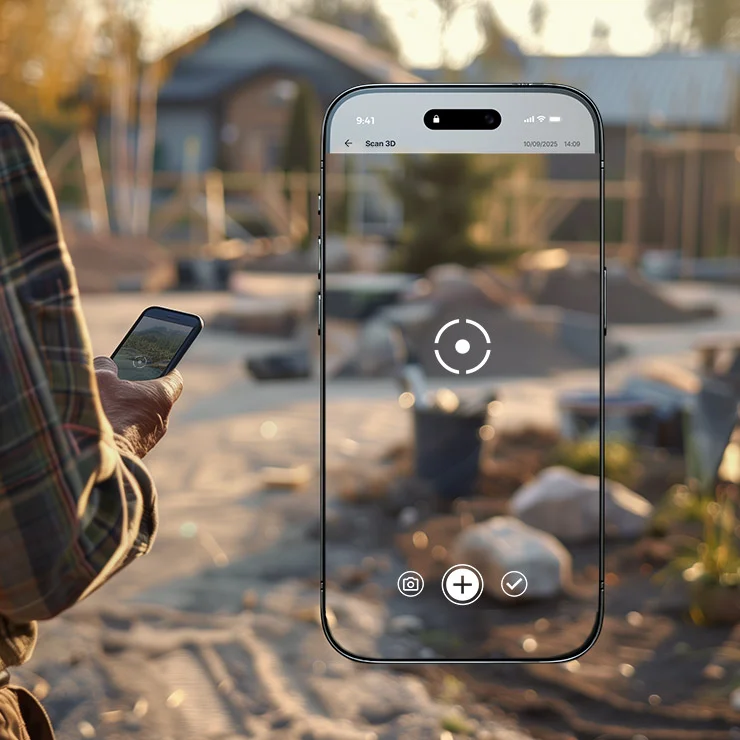
Over the years, technological advancements have continued to grow. Today, field measurements are no longer done with a tape measure and string but with your smartphone, capable of providing precise geometric data. Using your phone’s camera, the Ezeecam App will allow you to capture points in space in front of your camera and thus define distances and surfaces in augmented reality.

Start your augmented reality tracing
Start your tracing with Ezeecam. To do this, two modes are available:
- Manual acquisition: Using the target placed in the middle of your screen and the capture button located at the bottom of your smartphone, you can start positioning your first points manually. Place as many as necessary on your surface to get the most accurate perimeter possible;
- Automatic acquisition: In automatic mode, the Ezeecam app will automatically detect your movements and position a point every 50 cm in the middle of your screen. You can configure this mode by changing the automatic point-taking distance directly in the app.
Your scale plan on your smartphone
Start your design with Ezeecam. To do this, two modes are available: Once your acquisition is complete, you will obtain the scaled outline of your area. You can quickly obtain the square meterage, perimeter, and location.
-

Mesure simple et cumulée
Mesurer des distances précises en utilisant la caméra du smartphone. Des calculs rapides et fiables sans équipement supplémentaire.
-
Acquisition 2D
Tracez et définissez les contours de surfaces directement sur le terrain en utilisant la réalité augmentée.
-

Acquisition 3D
Scannez l’environnement autour de vous pour générer un nuage de points en 3D.
-
Altimétrie
Capturez les altitudes des différents points sur un terrain pour obtenir des mesures topographiques précises.
-

Long profile
Créez des profils en long pour analyser les variations de niveau le long d’une ligne tracée sur le terrain.


Try Ezeecam Free
3 demonstration projectsDiscover Ezeecam now and take advantage of our 100% free offer to familiarize yourself with our software.
Experiment with all the measuring and flooring tools available for these projects.
Don't miss this opportunity and join us now!
Discover for free arrow_forward